Materials
Mixing per-instance custom data and custom data
You can send arbitrary float data to materials through static mesh components and instanced static mesh components (ISMC).
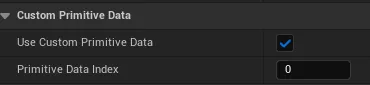
For normal static mesh components, you must create ScalarParameter and VectorParameter nodes and then check “Enable Custom Primitive Data” on the Details panel.
To send the data from C++, use functions like SetCustomPrimitiveDataFloat and SetCustomPrimitiveDataVector4f.
For ISMCs, you need to use “PerInstanceCustomData” and “PerInstanceCustomData3Vector” nodes.
In C++ you need to call SetNumCustomDataFloats before creating instances.
Send data with SetCustomData.
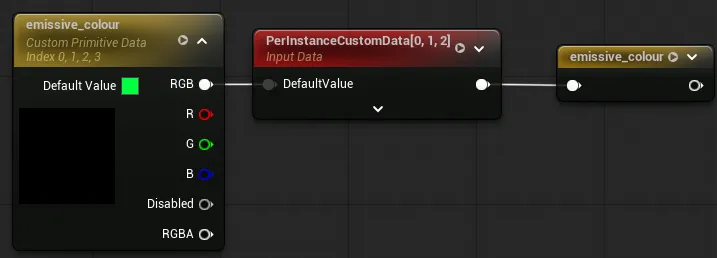
To use both systems together, feed the vector parameter into the per-instance node as its default as shown below.
Sources: Storing Custom Data in Materials Per-Primitive
Handling vector parameters with both systems
Vector parameters take 4 custom data slots whereas the ISMC node only has a 3-value vector.
This may seem like the two systems clash as you may want [3] to represent something other than alpha.
In practice, this is not an issue.
UPrimitiveComponent (which UStaticMeshComponent inherits from) has functions like SetCustomPrimitiveDataVector3f which allow you to set only 3 values at a time.
You can simply ignore the alpha channel and use [3] for something else.
For documentation purposes, it may be good to mark the alpha channel as “Disabled” in the details panel as in the image above.