UObjects
Add a button to the editor details panel
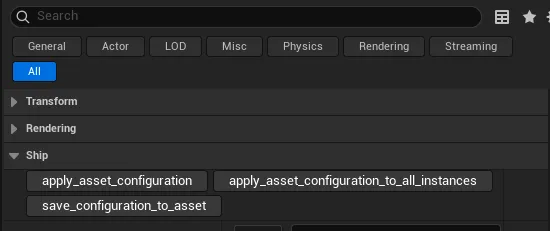
Using CallInEditor with UNFUNCTION allows you to put a button in the editor details panel.
UFUNCTION(CallInEditor, Category = "Ship")
void apply_asset_configuration();
Interfaces
I couldn’t make interfaces show up in the editor i.e.
UPROPERTY(EditAnywhere, Category = "Ship")
TScriptInterface<ITestEntity> target_ship{nullptr};
I tried to use a constrained AActor* using ObjectMustImplement however the filtering didn’t seem to work.
UPROPERTY(EditAnywhere,
          meta = (ObjectMustImplement = "/Script/Sandbox.TestEntity"),
          Category = "Ship")
TObjectPtr<AActor> target_ship{nullptr};
It seems using AActor* properties and CastChecked is the simplest solution.
auto const* const target_entity_interface{CastChecked<ITestEntity>(target)};
auto const target_handle{target_entity_interface->get_entity_handle()};
CastChecked
CastChecked<T> is a useful function.
It is equivalent to
auto foo{Cast<T>(bar)};
check(foo);